

Appearance
Email access
Otto reads and sends email from the inboxes you connect — to log conversations against projects, draft replies, and follow up on open commitments. It never sees a password: every connection runs through your provider's own sign-in (Microsoft or Google), and Otto only receives a token scoped to what you approved.
The two access modes
Every Otto workspace is set to exactly one access mode, decided by Otto — not something you toggle yourself.
| Organization mode | Per-user mode | |
|---|---|---|
| Who grants access | One IT admin, once, for the whole tenant or domain | Each person, for their own inbox only |
| What Otto can reach | Any mailbox you explicitly attach afterward | Only the mailboxes people individually approve |
| Best for | Centrally managed rollouts | Narrower blast radius — Otto's recommended default |
Which mode am I on?
Open Workspace Manager → Settings → Integrations in Otto and compare against these two.
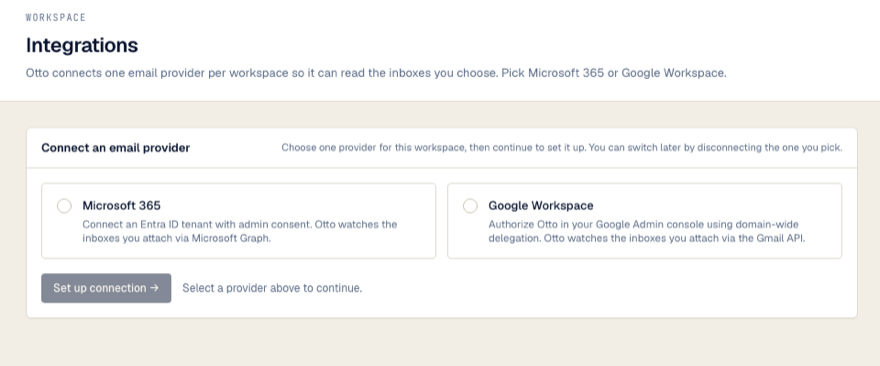
Organization mode
One Connect an email provider card, and a choice between Microsoft 365 and Google Workspace. No list of people. Once a provider is connected, the card shows that provider marked Connected instead.
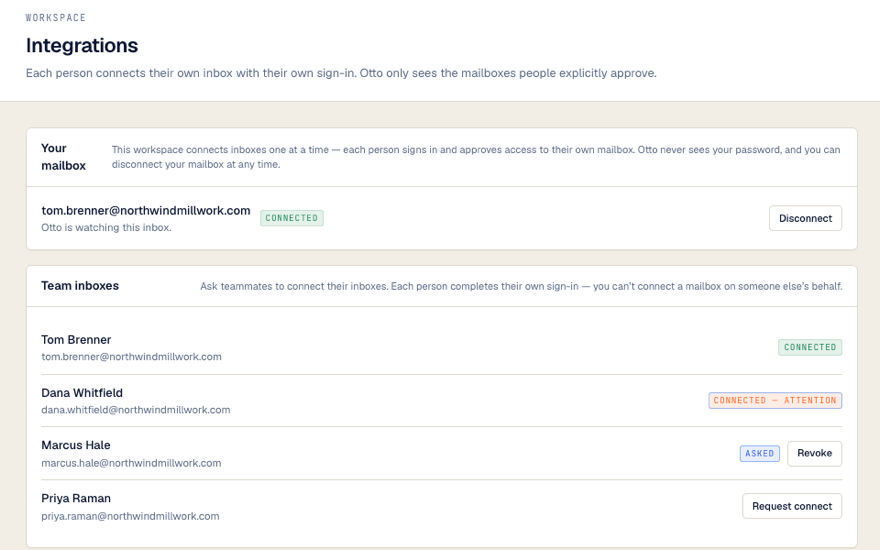
Per-user mode
A Your mailbox card for you (it says Connect your mailbox until you connect), and, for owners and admins, a Team inboxes list naming each person on the workspace.
Mode is fixed per workspace
Workspace admins and owners can't switch modes from inside Otto — it's an account-level decision made when your workspace is provisioned. If you believe you're on the wrong mode, contact Otto support; switching requires every currently connected mailbox to be disconnected first.
Next
- Before you start — who needs to be in the room, by mode and provider
- Connecting email — the actual steps