

Appearance
Managing team access
This page applies to per-user mode. In organization mode, mailboxes are attached by an admin rather than connected by each person — see Connecting email.
Reading the roster
In per-user mode, owners and admins see every workspace member's connection state in the Team inboxes list on the Integrations page.
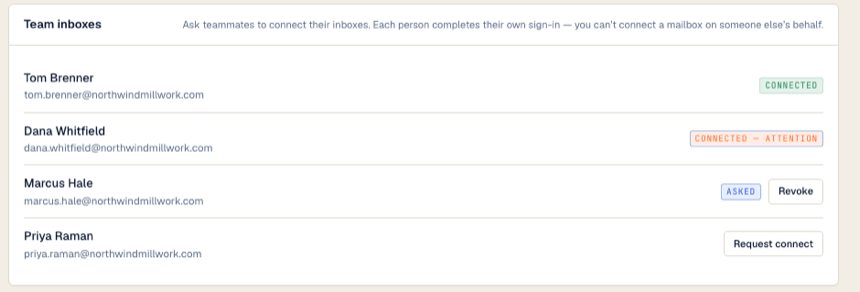
| What you see | What it means |
|---|---|
| Connected | Their mailbox is attached and Otto is watching it normally. |
| Connected — attention | Attached, but live updates for that inbox are paused. Otto still checks for new mail every few hours. For Google mailboxes Otto retries on its own; for Microsoft 365 the person disconnects and connects again to restore live updates. |
| Asked | A connect request is pending. Select Revoke to cancel it. |
| Request connect button | No mailbox and no pending request. Select it to ask them. |
The Members page shows the same thing in its Inbox column: Connected, Asked or Not connected.
Owners and admins can always reconnect
Owners and admins can connect their own mailbox again at any time. A member who disconnects their mailbox needs a new Request connect before they can connect again.
Disconnecting a mailbox
Each person disconnects their own mailbox: Workspace Manager → Settings → Integrations → Your mailbox → Disconnect. The Team inboxes list doesn't have a disconnect button, so an admin can't disconnect a teammate's mailbox from there.
Disconnecting immediately stops Otto from reading that inbox and deletes the stored access token. It does not touch anything in the mailbox itself, and reconnecting later is just the connect flow again.
Offboarding someone
Ask them to disconnect their mailbox before they leave — that deletes Otto's stored token straight away. Removing someone from the workspace does not disconnect their mailbox by itself.
If they've already gone, revoke Otto's access at the provider (see Revoking access at the source) or contact Otto support. If your offboarding process disables their provider account, Otto's access also lapses on its own the next time it tries to refresh.